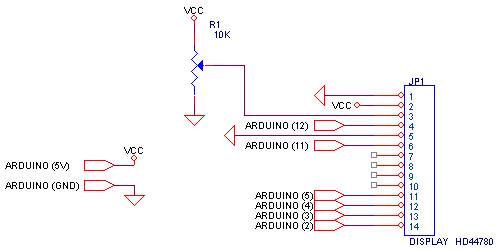
Interfaccia display con
scheda Arduino
Specifiche
display
Software
// commands
#define LCD_CLEARDISPLAY 0x01
#define LCD_RETURNHOME 0x02
#define LCD_ENTRYMODESET 0x04
#define LCD_DISPLAYCONTROL 0x08
#define LCD_CURSORSHIFT 0x10
#define LCD_FUNCTIONSET 0x20
#define LCD_SETCGRAMADDR 0x40
#define LCD_SETDDRAMADDR 0x80
// flags for display entry mode
#define LCD_ENTRYRIGHT 0x00
#define LCD_ENTRYLEFT 0x02
#define LCD_ENTRYSHIFTINCREMENT 0x01
#define LCD_ENTRYSHIFTDECREMENT 0x00
// flags for display on/off control
#define LCD_DISPLAYON 0x04
#define LCD_DISPLAYOFF 0x00
#define LCD_CURSORON 0x02
#define LCD_CURSOROFF 0x00
#define LCD_BLINKON 0x01
#define LCD_BLINKOFF 0x00
// flags for display/cursor shift
#define LCD_DISPLAYMOVE 0x08
#define LCD_CURSORMOVE 0x00
#define LCD_MOVERIGHT 0x04
#define LCD_MOVELEFT 0x00
// flags for function set
#define LCD_8BITMODE 0x10
#define LCD_4BITMODE 0x00
#define LCD_2LINE 0x08
#define LCD_1LINE 0x00
#define LCD_5x10DOTS 0x04
#define LCD_5x8DOTS 0x00
#define  _rs_pin       12  //RS
#define  _enable_pin   11  //EN

uint8_t  _data_pins[4]={
                       5, //D4
                       4, //D5
                       3, //D6
                       2  //D7
                     };

uint8_t _displayfunction;
uint8_t _displaycontrol;
uint8_t _displaymode;
uint8_t _numlines = 2;
uint8_t _currline = 0;

void pulseEnable(void) {
  digitalWrite(_enable_pin, LOW);
  delayMicroseconds(1);
  digitalWrite(_enable_pin, HIGH);
  delayMicroseconds(1);    // enable pulse must be >450ns
  digitalWrite(_enable_pin, LOW);
  delayMicroseconds(200);   // commands need > 37us to settle
}

void write4bits(uint8_t value) {
  for (int i = 0; i < 4; i++) {
    pinMode(_data_pins[i], OUTPUT);
    digitalWrite(_data_pins[i], (value >> i) & 0x01);
  }
  pulseEnable();
}

void WrDBus(uint8_t value)
{
  write4bits(value>>4);
  write4bits(value);
}

void command(uint8_t value) {
  digitalWrite(_rs_pin, LOW);
  WrDBus(value);
}

void wrdata(uint8_t value) {
  digitalWrite(_rs_pin, HIGH);
  WrDBus(value);
}

// Turn the display on/off (quickly)
void noDisplay() {
  _displaycontrol &= ~LCD_DISPLAYON;
  command(LCD_DISPLAYCONTROL | _displaycontrol);
}
void display() {
  _displaycontrol |= LCD_DISPLAYON;
  command(LCD_DISPLAYCONTROL | _displaycontrol);
}

/********** high level commands, for the user! */
void clear()
{
  command(LCD_CLEARDISPLAY);  // clear display, set cursor position to zero
  delay(10);  // this command takes a long time!
}

void setCursor(uint8_t col, uint8_t row)
{
  int row_offsets[] = { 0x00, 0x40, 0x14, 0x54 };
  if ( row >= _numlines ) {
    row = _numlines-1;    // we count rows starting w/0
  }
  command(LCD_SETDDRAMADDR | (col + row_offsets[row]));
}

void WrStr(String a)
{
  for (int i = 0; i < a.length(); i++) {
   wrdata(a[i]);
  }
}

void initLCD()
{
  pinMode(_rs_pin, OUTPUT);
  pinMode(_enable_pin, OUTPUT);
  _displayfunction = LCD_4BITMODE | LCD_2LINE | LCD_5x8DOTS;
  _numlines = 2;
  _currline = 0;
  // SEE PAGE 45/46 FOR INITIALIZATION SPECIFICATION!
  // according to datasheet, we need at least 40ms after power rises above 2.7V
  // before sending commands. Arduino can turn on way befer 4.5V so we'll wait 50
  delayMicroseconds(50000);
  // Now we pull both RS and R/W low to begin commands
  digitalWrite(_rs_pin, LOW);
  digitalWrite(_enable_pin, LOW);
  // this is according to the hitachi HD44780 datasheet
  // figure 24, pg 46
  // we start in 8bit mode, try to set 4 bit mode
  write4bits(0x03);
  delayMicroseconds(4500); // wait min 4.1ms
  // second try
  write4bits(0x03);
  delayMicroseconds(4500); // wait min 4.1ms
  // third go!
  write4bits(0x03);
  delayMicroseconds(150);
  // finally, set to 4-bit interface
  write4bits(0x02);
  // finally, set # lines, font size, etc.
  command(LCD_FUNCTIONSET | _displayfunction);
  // turn the display on with no cursor or blinking default
  _displaycontrol = LCD_DISPLAYON | LCD_CURSOROFF | LCD_BLINKOFF;
  display();
  // clear it off
  clear();
  // Initialize to default text direction (for romance languages)
  //_displaymode = LCD_ENTRYLEFT | LCD_ENTRYSHIFTDECREMENT;
  // set the entry mode
  //command(LCD_ENTRYMODESET | _displaymode);
}

/*
01234567890123456789
A0:0.000   A1:0.000
A2:0.000   A3:0.000
*/

void setup() {
  // put your setup code here, to run once:
  Serial.begin(9600);
  initLCD();
  WrStr("A0:");
  setCursor(11, 0);
  WrStr("A1:");
  setCursor(0, 1);
  WrStr("A2:");
  setCursor(11, 1);
  WrStr("A3:");
}

void loop() {
  char b[30];
  setCursor(3, 0);
  dtostrf(analogRead(0)*5.0/1023,5, 3,b);
  WrStr(b);
  Serial.print("A0:");Serial.print(b);
  setCursor(14, 0);
  dtostrf(analogRead(1)*5.0/1023,5, 3,b);
  WrStr(b);
  Serial.print(" A1:");Serial.print(b);
  setCursor(3, 1);
  dtostrf(analogRead(2)*5.0/1023,5, 3,b);
  WrStr(b);
  Serial.print(" A2:");Serial.print(b);
  setCursor(14, 1);
  dtostrf(analogRead(3)*5.0/1023,5, 3,b);
  WrStr(b);
  Serial.print(" A3:");Serial.println(b);
}
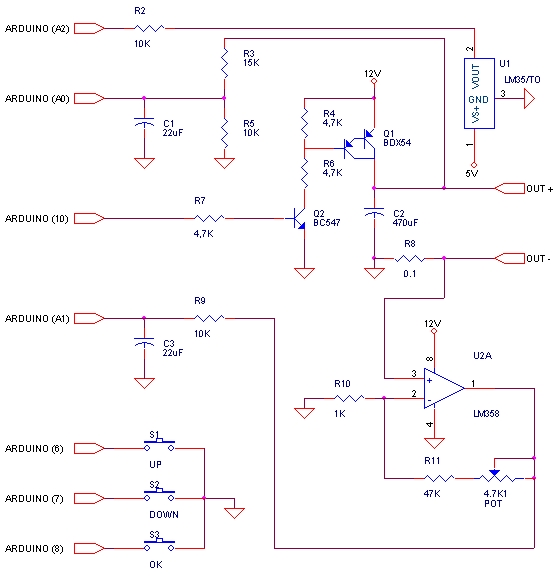
Alimentatore switching stabilizzato con regolazione di corrente e tensione
gestito da sistema a microcontrollore
(Hardware aggiuntivo all' interfaccia display con scheda Arduino)
Software
/*
  Alimentatore con regolazione di tensione e corrente di CC.
  gestito da microcontrollore
*/
#define VoutPin  A0  //Ingresso analogico per misura tensione di uscita
#define IoutPin  A1  //Ingresso analogico per misura corrente di uscita
#define TempPin  A2  //Ingresso analogico per misura temperatura transistor di potenza
#define UpPin     6  //Ingresso pulsante UP per impostazione riferimento
#define DwPin     7  //Ingresso pulsante DW per impostazione riferimento
#define OkPin     8  //Ingresso pulsante OK per scelta VRe IRef
#define PWMPin   10  //Uscita PWM

#define Vfs 12.0     //Fondoscala in misura tensione di uscita (V)
#define Ifs 2.0      //Fondoscala in misura corrente di uscita (I)
//Variabili
int Vout,            //Ultimo valore di tensione di uscita letto in val ADC (0..1023)
    Iout,            //Ultimo valore di corrente di uscita letto in val ADC (0..1023)
    RVout=0,         //Valore di tensione di riferimento in val ADC (0..1023)
    RIout=0,         //Valore di corrente di riferimento in val ADC (0..1023)
    PWmOut=0;        //Valore del PWM di uscita
unsigned long time;  //variabile per elaborazione ritardi
int sel=0;           //puntatore alla valore da modificare (RVout o RIout)
char b[30];          //buffer di appoggio per le stampe su display
int rit=50;          //ritardo repeat tasti (ms)

//Stampa su display i valore di RVout in Volt
void PrRefV()
{
  setCursor(3, 1);
  dtostrf(RVout*Vfs/1023,5, 2,b);
  WrStr(b);
}
//Stampa su display i valore di RIout in Volt
void PrRefI()
{
  setCursor(12, 1);
  dtostrf(RIout*Ifs/1023,4, 2,b);
  WrStr(b);
}
//-----------------------------------------------------------------
void setup() {
  //Inizializzazione ingressi tastrierino in modalità pull-up
  pinMode (UpPin,INPUT_PULLUP);
  pinMode (DwPin,INPUT_PULLUP);
  pinMode (OkPin,INPUT_PULLUP);
  initLCD();
  //Scrive i testi statici sul display
  WrStr("Vo:");
  setCursor(9, 0);
  WrStr("Io:");
  setCursor(0, 1);
  WrStr("RV:");
  setCursor(9, 1);
  WrStr("RI:");
  //Scrive il valore iniziale  RVout e RIout
  PrRefV();
  PrRefI();
}
//-----------------------------------------------------------------
void Regolatore()
{
  //Limitazione di corrente
  if (Iout>RIout)
  {
    PWmOut--;
  }
  else
  {
    //Regolazione di tensione
    if (Vout>RVout)
      PWmOut--;
    if (Vout<RVout)
      PWmOut++;
  }
  //Tosatore
  if (PWmOut>255) PWmOut=255;
  if (PWmOut<0)   PWmOut=0;
  //Output del valore PWM
  analogWrite(PWMPin,PWmOut);
}

//-----------------------------------------------------------------
void loop() {
  //Legge Vout e Iout
  Vout=analogRead(VoutPin);
  Iout=analogRead(IoutPin);
  //Scrive su display i valori di Vout e Iout appena letti
  setCursor(3, 0);
  dtostrf(Vout*Vfs/1023,5, 2,b);
  WrStr(b);
  setCursor(12, 0);
  dtostrf(Iout*Ifs/1023,4, 2,b);
  WrStr(b);

  //Esegue la funzione di regolazione
  Regolatore();

  //Blocco gestione tastierino
  if (millis()>(time+rit))
  {
    //Verifica se OK è premuto
    if (!digitalRead(OkPin))
    {
      //Imposta ritardo di autorepeat in caso di pressione continua
      time=millis();
      rit=500;
      //incrementa selettore grandezza da modificare
      sel++;
      if (sel > 1)
        sel=0;
      //Evidenzia su display con il carattere ">" la grandezza abilitata alla modifica
      switch (sel)
      {
        case 0:
          setCursor(2, 1);
          WrStr(">");
          setCursor(11, 1);
          WrStr(":");
        break;
        case 1:
          setCursor(2, 1);
          WrStr(":");
          setCursor(11, 1);
          WrStr(">");
        break;
      }
    }
    //Verifica se Up è premuto
    if (!digitalRead(UpPin))
    {
      //Imposta ritardo di autorepeat in caso di pressione continua
      time=millis();
      rit=50;
      switch (sel)
      {
         //incrementa RVout
         case 0:
           if (RVout<1023)
           {
             RVout++;
             PrRefV();
           }
         break;
         //incrementa RIout
         case 1:
           if (RIout<1023)
           {
              RIout++;
              PrRefI();
           }
         break;
      }
    }
    //Verifica se Dw è premuto
    if (!digitalRead(DwPin))
    {
      //Imposta ritardo di autorepeat in caso di pressione continua
      time=millis();
      rit=50;
      switch (sel)
      {
         //decrementa RVout
         case 0:
           if (RVout>0)
           {
              RVout--;
              PrRefV();
           }
         break;
         //decrementa RIout
         case 1:
           if (RIout>0)
           {
             RIout--;
             PrRefI();
           }
         break;
      }
    }
  }
}